If you have already connected your project to GIT by means of other GIT GUI tools and now want to use GIT SCC Proxy, you have to perform a number of additional operations depending on the IDE you use. Mind that adding of the project again, now from the IDE, will cause errors.
If you use MS VS or MS VB, just install the plug-in and open the project. The only way of adding the project in PowerBuilder is moving it to a local disk and re-creating the project file (re-connecting all elements), having connected it to SourceControl beforehand.
When using VS.NET you have to
- open the project;
- call the command
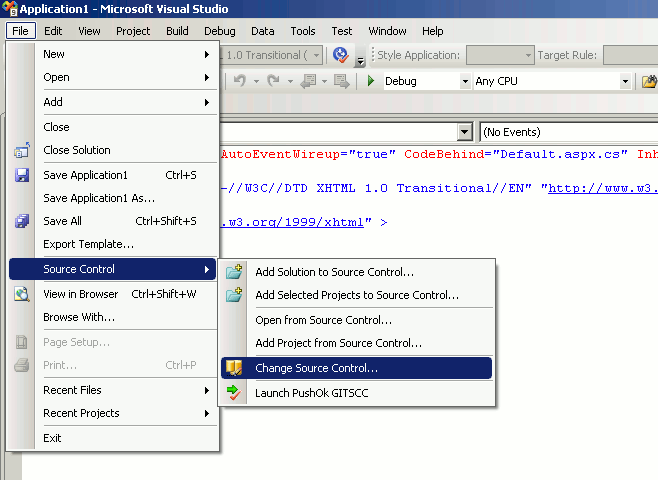
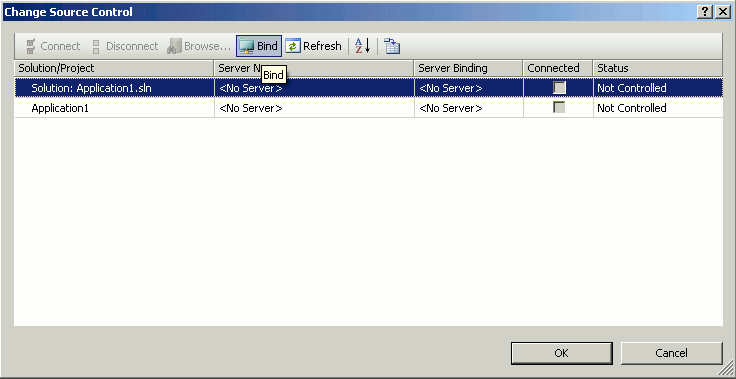
- select all projects in the open window and press 'Bind'.
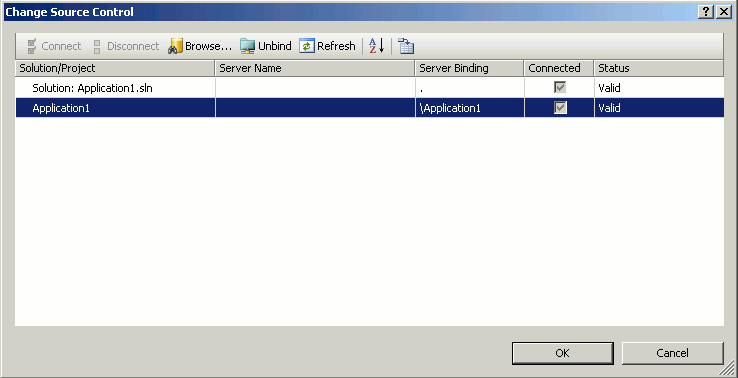
- After this you have to check in the modified project files to SourceControl.
The thing is that VS.NET stores the 'Source Control Binding' special information in the project files. Without this information IDE thinks that the project is not connected to Source Control, and as a result it cannot work with the plug-in correctly.
 Software

 Fast Links
  news and events


