Using GIT SCC Proxy through IDE regularly there is a requirement to execute operation which are not provided by "classical" (distributed) ideology SCC. Therefore for the convenience, all "specific" and simply advanced commands have been collected in one place. For access to them it is necessary to execute:
[MS VS.NET]
Select solution. Choose .
[MS VS 2005]
[MS VS]
[MS VB]
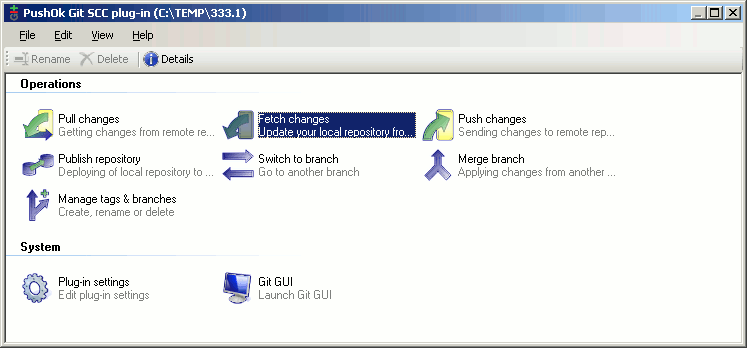
After that you will see this window which allows to execute such important commands as:
Pull changes,
Push changes,
Publish repository,
Switch to branch,
Merge branch,
Manage tags & branches.
Also it allows
to change Plug-in settings and
to open Git GUI.
Not terribly if you suddenly see such window
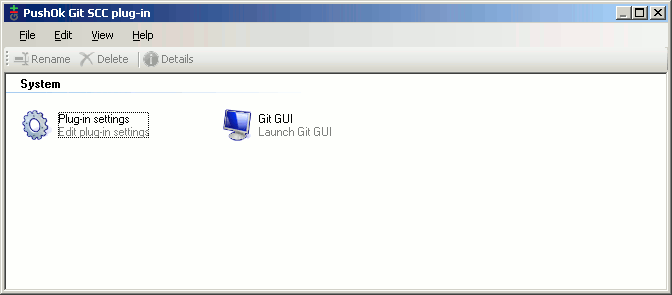
It only means that you had not time to add yet your project under source control or have made it just moment.
After project addition under source control, simply reload IDE and this window will open with correct contents.
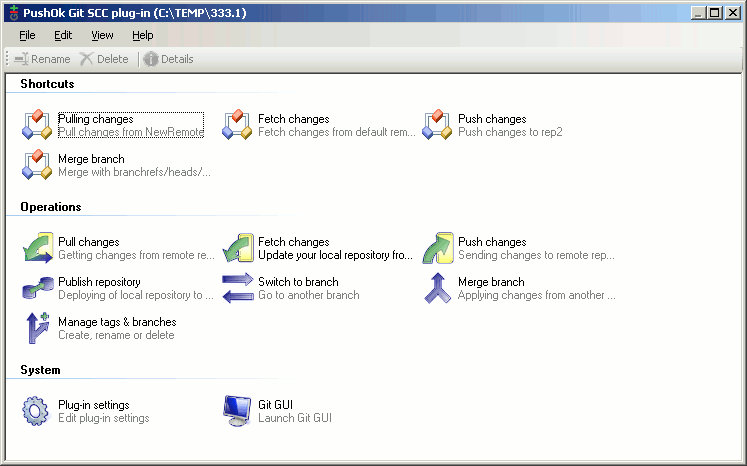
Specially for developers conducting active data exchange with colleagues, we realised a shortcut for commands "Push", "Pull", "Fetch" and "Merge". They allow to execute these commands by one click of the mouse.
What to create reduction is necessary after ending of one of these commands to switch on a check-box "Save as shortcut" on last pages of a wizard,
after that all current options of this wizard will be saved and in GIT manager window will appear a new shortcut.
On this picture it is shown one shortcut for a command, but you can tune them at own discretion.
 Software

 Fast Links
  news and events


