The "Known lists" window was needed for editing of some auxiliary lists. You can use these lists when you opened "Bind to CVS" dialog, it is "Roots", "Modules" and "Tags" lists. These lists help you to simplify your work with your repositories. Now you can tune these lists as you wish by using this dialog.
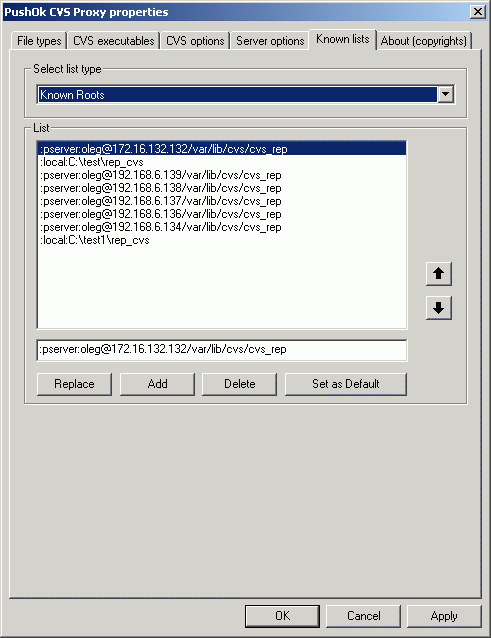
Select list type
Combox box which allows to select list for editing.
- Known Roots
It is list of Roots which you open by plug-in.
- Known Modules
It is list of Modules which you open by plug-in.
- Known Tags
It is list of Tags which you open by plug-in.
List
- UP arrow and DOWN arrow
These buttons move select on elements of the list
- Replase
The text from edit field will be written in selected place in the list. The selected text in the list will be lost.
- Add
The text from edit field will be added in in the list as new line.
- Delete
You will delete selected line.
- Set as Default
Press this button to assign the current settings as the default settings. Default settings have effect for new repositories. (It is analog of Default button in Server options page.)
 Software

 Fast Links
  news and events


